 PlayEarn
How to Download and Install CK777 on Android (Step-by-Step)
How to Download and Install CK777 on Android
The CK777 Download is available as an Android APK rather than a standard Google Play installation. That means users need to download the file, approve one Android security setting and install the app manually.
The process takes only a few minutes when the correct APK is used. Most installation problems come from incomplete downloads, insufficient storage, older app versions or blocked browser permissions.
This guide explains how to download CK777, install it safely, create an account and solve the errors Android users face most often. It also covers APK permissions, updates, OTP verification and basic account protection. First-time Android users should read our complete guide on how to install APK files safely on Android.
CK777 is a real-money gaming platform intended for adults aged 18 or older. Deposited funds can be lost, so set a spending limit before opening any paid game.
CK777 Download Overview
| App detail | Information |
|---|---|
| App name | CK777 |
| File type | Android APK |
| Supported platform | Android phones and tablets |
| Recommended Android version | Android 5.0 or newer |
| Suggested free storage | At least 60 MB |
| Internet requirement | Stable Wi-Fi or mobile data |
| Registration | Active mobile number and OTP |
| Minimum age | 18 years |
| Play Store installation | Not available |
| Main installation permission | Install unknown apps |
| Main risk | Financial loss through real-money games |
The exact APK size, version number, payment options and promotional terms can change when a new release is published. Use the latest file shown on the CK777 download page instead of installing an old copy saved on another device.
What Is the CK777 APK?
APK stands for Android Package Kit. It is the file format Android uses to install applications.
Apps downloaded through Google Play install automatically in the background. A direct APK requires the user to open the downloaded file and approve installation from the browser or file manager.
Manual installation is common for gaming platforms that distribute their Android apps outside Google Play. The extra steps are straightforward, but the download source matters.
A fake APK can copy the CK777 name, logo and login screen while containing altered code. Such files can expose passwords, wallet details or one-time verification codes.
Find the newest CK777 version on PlayEarn.com.pk and avoid files forwarded through unknown WhatsApp groups, Telegram channels or social media messages.
CK777 Android Requirements
Check your phone before starting the download.
Minimum Device Requirements
Your Android device should have:
- Android 5.0 or a newer operating system
- At least 60 MB of available storage
- A working Wi-Fi or mobile-data connection
- An active SIM for OTP verification
- A supported mobile browser
- Enough battery to complete the installation
- The correct date and time settings
- Access to the Downloads folder
Older or low-storage phones can still open the APK download page, but installation can fail if Android lacks space to unpack the application. Minimum requirements do not guarantee smooth performance. Our budget Android gaming test records loading times, crashes, heat and data use on a low-cost phone.
Keeping extra storage available also helps the app download updates, save temporary files and load game content.
Account Requirements
CK777 registration generally requires:
- An active mobile number
- Access to the OTP sent to that number
- A secure account password
- Accurate payment details for deposits or withdrawals
- Confirmation that the user is at least 18 years old
Never create an account using a number you do not control. Losing access to the SIM can make password recovery and account verification difficult.
Before You Download CK777
A few checks before installation can prevent most Android errors.
Our casino APK installation checklist also covers fake download pages, suspicious permissions and cloned application files.
Remove Suspicious or Old APK Files
Open the Downloads folder and remove previous CK777 APK files that came from untrusted sources. Several files with similar names make it easy to open the wrong version.
A legitimate-looking filename alone does not prove that the file is safe.
Check Available Storage
Go to:
Settings > Storage
Keep at least 60 MB free for the APK and additional space for installation. Android needs room for both the downloaded package and the installed application.
Delete unused videos, duplicate downloads or temporary files when storage is low.
Use a Stable Connection
A weak connection can stop the download before the APK is complete. The file can still appear in the Downloads folder even though part of it is missing.
Use reliable Wi-Fi or a stable mobile-data signal. Avoid switching networks while the APK is downloading.
Keep Android Security Active
Do not disable Play Protect, antivirus scanning or other phone-security features simply to install CK777.
Android only needs permission to install an app from the specific browser or file manager used for the download. It does not require every security feature to be switched off.
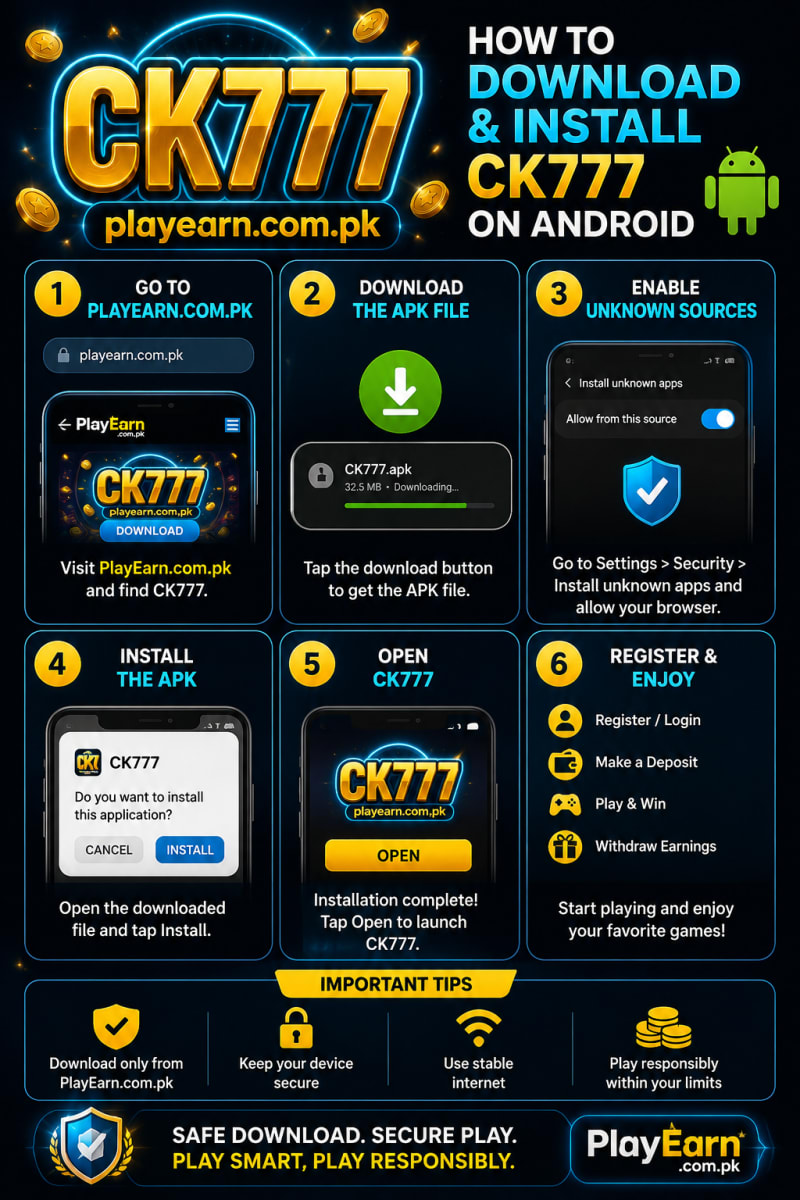
How to Download and Install CK777 on Android
Follow these steps in order.
Step 1: Download the CK777 APK
Open the CK777 page using Chrome, Samsung Internet or another trusted Android browser.
Tap the download button and allow the APK file to save to your phone. A download icon normally appears in the notification bar while the file is transferring.
Do not close the browser until the download finishes.
After completion, the file usually appears in one of these locations:
- Browser download list
- Android notification panel
- Downloads folder
- Files or My Files application
Install the latest release directly from PlayEarn.com.pk rather than using an APK copied from another phone.
Step 2: Open the Downloaded File
Tap the completed download notification or open the Downloads folder.
Select the CK777 APK file. Android will inspect the package before displaying the installation screen.
If installation from that browser is blocked, Android will show a security message. This is a standard protection for apps downloaded outside Google Play.
Step 3: Allow Installation From the Browser
Tap Settings on the warning screen.
You should see an option similar to:
- Allow from this source
- Install unknown apps
- Permit app installs
- Unknown source installations
Enable the permission for the browser or file manager currently opening the APK.
For example, if CK777 was downloaded through Chrome, approve the permission for Chrome. Do not enable it for unrelated applications.
Common Android paths include:
| Phone or Android interface | Typical menu path |
|---|---|
| Samsung | Settings > Security and privacy > More security settings > Install unknown apps |
| Xiaomi or Redmi | Settings > Privacy protection > Special permissions > Install unknown apps |
| Oppo or Realme | Settings > Security > Installation sources |
| Vivo | Settings > Security > Install unknown apps |
| Infinix or Tecno | Settings > Security > Install unknown apps |
| Stock Android | Settings > Apps > Special app access > Install unknown apps |
Menu names differ between phone models and Android versions. Search for “unknown apps” inside the Settings search bar when the option is hard to find.
Step 4: Install the CK777 APK
Return to the downloaded file after enabling the permission.
Tap Install and wait while Android copies the app to your device. Avoid restarting the phone, closing the installation window or opening the APK repeatedly.
When installation finishes, Android displays two options:
- Done
- Open
Tap Open to launch CK777 immediately or select Done to return to the home screen.
The CK777 icon should now appear in the app drawer.
Step 5: Turn Off Unknown-App Installation
After CK777 is installed, return to the same Android security menu.
Disable the permission given to the browser or file manager. This prevents another APK from installing through that source without a fresh approval.
Turning off the permission does not remove CK777 and does not stop the installed app from working.
Step 6: Register Your CK777 Account
Open CK777 and select the registration option.
Enter an active mobile number and request an OTP. The verification code should arrive through SMS.
Submit the code, create a strong password and complete any required profile details.
Use a password that:
- Contains a mix of letters and numbers
- Is not used for your email account
- Is not used for JazzCash or Easypaisa
- Does not contain your mobile number
- Is difficult for another person to guess
Never share your OTP, password, withdrawal code or mobile-wallet PIN with an agent, administrator or support account.
Step 7: Review the App Before Depositing
Do not rush from registration directly into a deposit.
Open the wallet, promotions and account sections first. Review the available payment methods, deposit limits, withdrawal rules and identity requirements.
Check that:
- Your mobile number is correct
- The app displays the expected CK777 branding
- Payment details appear inside the app
- The bonus terms are readable
- Withdrawal limits are shown
- Support access is available
- No unusual permission request appears
Stop using the app if the payment information changes unexpectedly or an individual asks you to send funds to a private number outside the normal deposit process.
For a practical comparison of Pakistan’s two main mobile-wallet options, read our JazzCash versus EasyPaisa payment test.
How to Check CK777 Bonus Conditions
A welcome bonus can make the first deposit look more valuable. The headline amount does not show how much betting is required before bonus-linked funds become withdrawable.
Read the promotion terms before tapping Claim.
Bonus Details to Review
Look for:
- Minimum qualifying deposit
- Bonus percentage
- Maximum bonus amount
- Wagering requirement
- Eligible games
- Excluded games
- Maximum stake per round
- Promotion expiry date
- Withdrawal restrictions
- Account-verification requirements
A wagering requirement controls how much eligible betting must be completed.
For example, a PKR 500 bonus with a ten-times wagering condition requires PKR 5,000 in qualifying bets. The requirement describes betting volume, not guaranteed winnings. Referral offers can carry similar conditions. Our guide explains the actual math behind bonus and referral earnings.
Skip the bonus when its conditions push you to deposit or play more than your original budget.
Common CK777 Installation Problems and Fixes
“App Not Installed” Error
This message can appear when an older CK777 version conflicts with the new APK.
Try these fixes:
- Close the installation screen.
- Check whether CK777 is already installed.
- Save any account details you need.
- Uninstall the older version.
- Restart the phone.
- Download the latest APK again.
- Open the new file and install it.
Low storage also triggers this error. Free additional space and repeat the installation.
A damaged or incomplete APK produces the same message. Delete the file before downloading it again.
“There Was a Problem Parsing the Package”
A parsing error often points to one of three problems:
- The APK did not download completely.
- The Android version is too old.
- The file is damaged or altered.
Delete the APK, restart the browser and download a fresh copy. Confirm that the phone runs Android 5.0 or newer.
Do not install a different file simply because its name includes “fixed,” “mod” or “compatible.” Once the app is working, review these settings to change after installing a gaming app.
CK777 APK Will Not Open
First, confirm that the file ends with .apk.
A browser can save an error page or incomplete temporary file instead of the real package when the connection drops.
Open the file details and check its size. A file showing zero bytes or an unusually small size is incomplete.
Delete it and start a new CK777 Download from PlayEarn.com.pk.
Download Is Blocked by the Browser
Some browsers display a warning because APK files can install applications.
Confirm that you opened the intended download page before proceeding. Do not bypass warnings for files received through unknown messages.
If the trusted file still does not download:
- Check browser storage permissions
- Clear the browser download history
- Confirm that free storage is available
- Restart the browser
- Switch to a stable network
- Try the phone’s standard browser
OTP Does Not Arrive
Check the entered number carefully. A single incorrect digit sends the code to another number or stops delivery.
Then:
- Confirm that the SIM has a signal.
- Disable airplane mode.
- Wait several minutes.
- Check the SMS inbox and blocked-message folder.
- Restart the phone.
- Request one new OTP.
Avoid tapping the request button repeatedly. Several requests in a short period can delay delivery or invalidate the earlier code.
Use the newest OTP received. Older codes often stop working after another request.
OTP Is Incorrect or Expired
Enter the code exactly as shown in the SMS. Do not include spaces.
When the code has expired, request a new one and submit it promptly. Confirm that the phone’s date and time are set automatically.
Incorrect device time can interfere with verification systems.
CK777 Opens but Games Do Not Load
A lobby can appear even when the connection is too weak to load individual games.
Try the following:
- Switch from Wi-Fi to mobile data
- Switch from mobile data to Wi-Fi
- Close CK777 completely
- Reopen the app
- Turn off battery-saver mode
- Disable a conflicting VPN
- Clear the app cache
- Restart the phone
To clear the cache:
Settings > Apps > CK777 > Storage > Clear Cache
Use Clear Cache, not Clear Data, unless you know your login details. Clearing app data signs the account out and removes locally saved settings.
CK777 Keeps Closing
Repeated crashes often come from low memory, an outdated APK or corrupted temporary files.
Close unused apps, clear the CK777 cache and restart the phone. Install the newest version when the current release is outdated.
Avoid downloading a modified APK advertised as a crash fix. Altered files create a greater security risk than the original error.
CK777 Shows a Blank or White Screen
A blank screen often appears when the app cannot load online content.
Check the connection, disable data-saving restrictions and allow CK777 to use background data.
The relevant setting is generally found under:
Settings > Apps > CK777 > Mobile data and Wi-Fi
Enable network access, then reopen the app.
CK777 Update Will Not Install
An update can fail when the new APK conflicts with an older signature or version.
Record your login information before making changes. Uninstall the current app only when installing over it fails.
Your account balance should be connected to the registered account rather than the local installation, but access still depends on having the correct mobile number and password.
Never uninstall the app when you do not know how to recover the account.
How to Update CK777 Safely
Direct APK apps do not always update automatically through Google Play.
When a new version is released:
- Open the trusted CK777 download page.
- Compare the available version with the installed version.
- Save your login details.
- Download the new APK.
- Open the file.
- Install it over the existing app.
- Launch CK777 and confirm that your account opens correctly.
- Delete the old APK from the Downloads folder.
Do not remove the existing app before trying the normal update installation. Installing over it usually keeps the local settings intact.
CK777 Account and Payment Safety
Installation safety is only one part of protecting a real-money account.
Protect Your Login
Do not share screenshots that show:
- Your mobile number
- OTP codes
- Account ID
- Wallet balance
- Withdrawal reference
- Password reset details
- Personal identification
Support teams do not need your mobile-wallet PIN to inspect an account problem. To understand how a cash-out request may move through different processing stages, read what happens after submitting a withdrawal.
Protect Your Mobile Wallet
Use a separate PIN for JazzCash or Easypaisa. Never use the same password for CK777 and a financial account.
Review every payment confirmation before approving it. A deposit request should show the expected recipient or payment channel.
Keep Transaction Records
Save:
- Deposit confirmations
- Withdrawal references
- Bonus terms
- Support conversations
- Payment screenshots
These records help when a transaction remains pending or the displayed balance does not update correctly.
Responsible Gaming Rules for CK777
CK777 contains real-money games. Winning rounds happen, but no game provides dependable income.
Use these rules before depositing:
- Set a fixed entertainment budget.
- Treat the full deposit as money already spent.
- Use small, consistent stakes.
- Set a session time limit.
- Set a maximum number of rounds.
- Stop after reaching the loss limit.
- Do not borrow money to play.
- Do not increase bets to recover losses.
- Do not use funds reserved for essential expenses.
- Do not play while angry, stressed or under financial pressure.
Changing games does not erase a loss. Moving from slots to cards or crash games keeps the same money at risk. Our two-week EP789 review provides another real example of deposits, game sessions, bonuses and small withdrawals.
When You Should Stop Using CK777
Close the app and take a break when:
- You deposit more than planned.
- You hide gaming transactions from family.
- You borrow funds for another session.
- You chase a previous loss.
- You cancel essential purchases to keep playing.
- You feel anxious when away from the app.
- You treat bonus credit as guaranteed profit.
- You continue after the game stops being enjoyable.
Real-money gaming should never interfere with food, rent, education, healthcare, debt payments or family responsibilities.
Final Verdict
Downloading CK777 on Android is straightforward when the correct APK and security settings are used. Download the file, approve installation for the selected browser, complete the setup and switch the permission off again.
Most technical problems have simple causes. Old app versions, limited storage, incomplete downloads, weak connections and repeated OTP requests account for many failed installations.
The greater concern is not the manual APK process itself. It is downloading an altered file, exposing account details or depositing without understanding the financial risk.
Use a unique password, keep your OTP private, read every bonus condition and review payment limits before adding funds. Download the latest APK from PlayEarn.com.pk rather than installing copies shared through unknown groups.
Readers comparing similar platforms can explore our guide to the best 777 games in Pakistan.
Frequently Asked Questions About CK777 Download
How do I download CK777 on Android?
Open the CK777 download page in a trusted Android browser, tap the APK download button and wait for the file to finish. Open the APK from the Downloads folder and approve installation from that browser.
Is CK777 available on the Google Play Store?
No. CK777 is installed through a direct Android APK file rather than through Google Play.
Is the CK777 APK free to download?
The installation file is available without an app-purchase charge. Real-money games require deposited funds, and those funds can be lost.
Why does Android block the CK777 installation?
Android blocks apps from outside Google Play until the user approves the download source. Enable “Install unknown apps” for the browser used to download CK777, then switch the permission off after installation.
Why does CK777 show “App Not Installed”?
An older CK777 version, limited storage, a damaged APK or an incomplete download can trigger the error. Remove the old version when necessary, free storage and download a fresh APK.
Why am I not receiving the CK777 OTP?
Confirm that the number is correct, the SIM has a signal and the SMS inbox is working. Wait several minutes before requesting one new code.
Can I install CK777 on an iPhone?
An Android APK cannot be installed on an iPhone. APK files work only on Android devices.
How do I update the CK777 app?
Download the newest APK from the trusted download page and install it over the existing version. Keep your login details available before starting the update.
Can I play CK777 without depositing money?
You can open the app and explore available sections after registration. Real-money rounds require a funded balance, while access to demo-style features depends on the game.
Is CK777 safe to use?
Safety depends on the APK source, app permissions and how the account is protected. Avoid forwarded files, use a unique password, keep security scanning active and never share wallet PINs or OTP codes.
What Android version does CK777 require?
Android 5.0 or newer is the recommended minimum. Newer Android versions provide stronger security controls and broader app compatibility.
What should I do after installing CK777?
Disable the unknown-app permission, register with your own mobile number, review account settings, read bonus conditions and set a spending limit before depositing.
Is CK777 suitable for users under 18?
No. CK777 is a real-money gaming platform for adults aged 18 or older.