 PlayEarn
GN55 Game APK Guide for Pakistan: Download, Setup and Account Help
Finding a GN55 Game download button is easy. Working out which file is current, where it came from and whether the published details can be trusted takes more care.
During our research, we found conflicting version numbers, file sizes, ratings and compatibility claims across GN55 download pages. One page may describe the app as Android-only, while another suggests it also works on iOS. Payment limits and withdrawal times aren’t consistent either.
This independent guide focuses on the information that actually helps: checking the GN55 APK, installing it correctly, protecting your account, understanding payment rules and fixing common errors. GN55 may include real-money activities, so treat it as entertainment rather than a reliable source of income.
Readers who want to see how the application may perform on entry-level devices can also read our GN55 budget Android performance review for a closer look at loading, storage use, device compatibility, stability, and common performance issues.
Research Note
This page is an independent informational resource. It doesn’t represent the GN55 developer or guarantee bonuses, earnings, withdrawals, app security or legal status.
GN55 Game Quick Summary
Quick Summary
- GN55 Game is commonly presented as an Android gaming and rewards application.
- Published version numbers and file sizes vary between download websites.
- Registration may require a Pakistani mobile number, password and OTP.
- Payment options, limits and processing times can change inside the app.
- Bonuses may include activity, deposit or withdrawal conditions.
- iPhone availability hasn’t been independently established.
- Users should inspect the APK before installing it.
- Gaming results and referral rewards aren’t guaranteed income.
GN55 Quick Facts
| Detail | Current information |
|---|---|
| App name | GN55 Game |
| File format | Android APK |
| Latest version | Check the downloaded APK before installation |
| File size | Published sizes vary between sources |
| Package name | Must be verified from the APK |
| Main platform | Android |
| iOS availability | Not independently established |
| Download cost | The APK may be free to download |
| Account requirement | Usually needed for full access |
| Payment methods | Confirm through the active payment screen |
| Target region | Primarily promoted to Pakistani users |
| Content reviewed | July 2026 |
Helpful Note: A polished download card doesn’t prove that its version number, rating or download count is accurate. Those details should match the file being offered.
What Is GN55 Game?
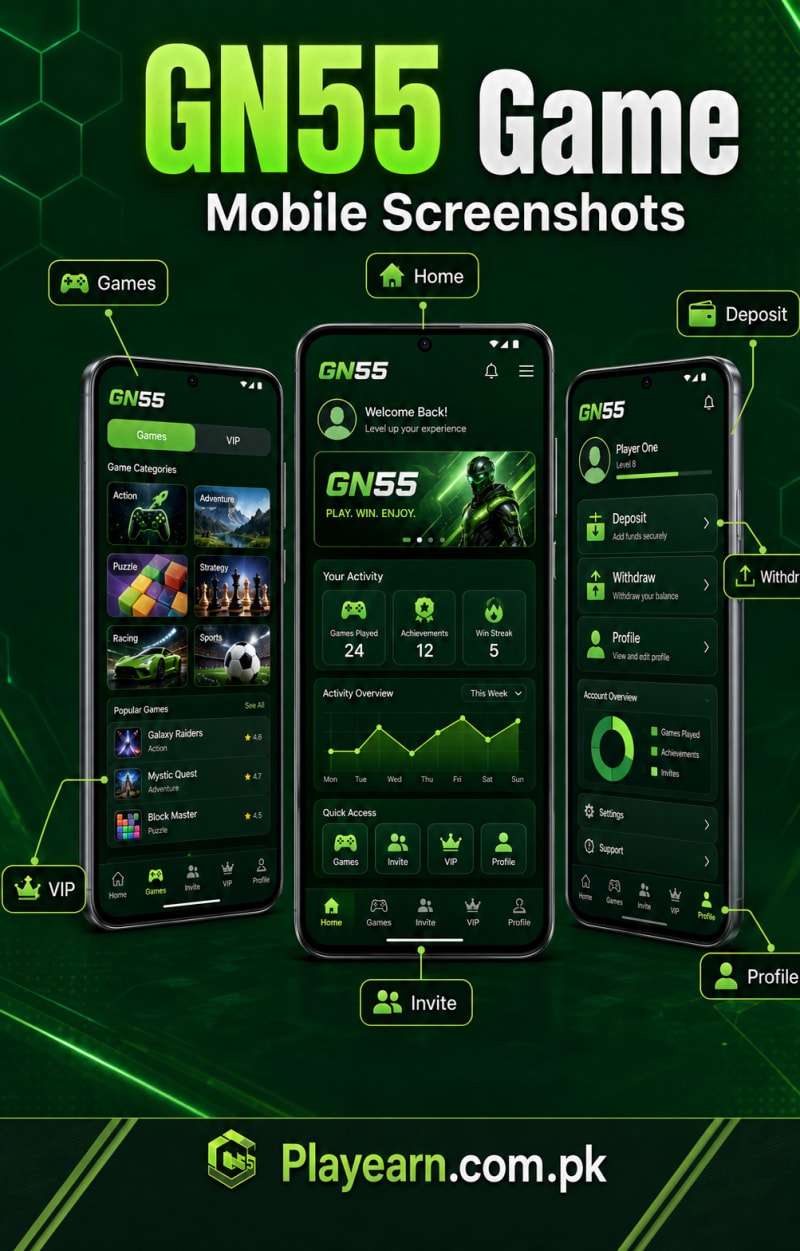
GN55 Game is presented as a mobile platform containing different games, account rewards and payment-related features. Users access the available options through one account instead of installing several individual gaming apps.
The platform is mainly associated with Android because it is distributed as an APK file. Unlike an app installed directly through Google Play, an APK downloaded from a website may require permission to install files from a browser or file manager.
Some activities may involve deposits, bonuses or real-money outcomes. That creates a financial risk as well as a security concern. Before opening a paid game, read its rules and confirm how deposits, bonus balances and withdrawals are handled.
GN55 Latest Version: What Should You Check?
Several websites publish different GN55 version numbers and file sizes. Choosing the highest number isn’t a reliable way to identify the newest release because modified or renamed files can display almost any version label.
A trustworthy version check should cover more than one detail.
GN55 Version Verification Checklist
APK version number
Exact file size
Package name
Release or update date
Minimum Android requirement
Developer or publisher name
Digital-signing certificate
SHA-256 checksum
Requested permissions
Official release notes or changelog
How to Verify the Current Release
- Open the GN55 download page you plan to use.
- Record the displayed version, file size and update date.
- Download the APK without installing it immediately.
- Review the file using a reputable APK inspection tool.
- Compare its package name and signature with a previously verified release.
- Scan the exact file for known security threats.
- Review the permissions requested during installation.
- Proceed only when the details remain consistent.
Warning: A larger version number doesn’t prove that an APK is newer, safer or genuine. Pay closer attention to its package name, signature and source.
What’s New in the Latest GN55 Update?
A reliable developer-controlled changelog wasn’t available in the material reviewed for this article. Claims about stronger security, faster payments or newly added games should remain unconfirmed until they appear in genuine release notes or can be observed during testing.
When verified information becomes available, publish it in a dated update table.
| Update detail | Information to record |
|---|---|
| Version | Verified APK version |
| Release date | Confirmed publication date |
| File size | Exact downloaded file size |
| New features | Options observed after updating |
| Bug fixes | Problems confirmed as resolved |
| Removed features | Tools or games no longer available |
| New permissions | Additional device access requested |
| Verification date | Date the file was inspected |
Avoid automatically displaying phrases such as “updated today.” Readers need to know when the APK itself was checked, not when a WordPress date was refreshed.
Main GN55 Game Features
GN55 features can vary by release, account type and region. The following categories are frequently associated with the platform, but each one should be checked inside the installed app before being presented as active.
Multiple Games Under One Account
GN55 is promoted as a platform containing several game types. Keeping them under one login makes browsing easier, though users should still learn the rules and financial risk of each game before placing paid entries. Users comparing another lightweight multi-game Android application can also explore Ji88 Game and review its categories, APK requirements, wallet features, and account tools.
A familiar-looking game isn’t automatically low risk. Check how an outcome is calculated, what each entry costs and whether a practice mode is available.
Account Dashboard
The dashboard may contain the account balance, available games, rewards area and transaction controls. Users should be able to see how their balance changes after a bonus, deposit, game result or withdrawal request.
Practical Tip: Take a screenshot before and after any important transaction. It creates a simple record if the balance doesn’t update correctly.
Daily and Event-Based Rewards
Login rewards, lucky draws and limited-time events are commonly mentioned in GN55 descriptions. These offers may expire quickly or apply only to selected accounts.
The amount displayed in a promotional banner isn’t the only detail that matters. Check its expiry date, eligible activities and withdrawal rules before accepting it.
Referral and Invitation System
Some users may receive an invitation code to share with new members. Referral rewards can depend on registration, first deposits or activity completed by the invited person. Read our referral commission calculation guide to understand how registrations, deposits, qualifying activity, commission percentages, and campaign conditions may affect the actual reward.
Don’t describe referrals as passive or guaranteed income. The platform can change qualification rules, commission percentages and payment conditions without notice.
Pakistan-Focused Payment Options
JazzCash, Easypaisa and bank-related methods are frequently linked with GN55. Availability can change between accounts, so the active deposit or withdrawal screen should be treated as the current reference. Users comparing another lightweight application with local-wallet features can explore OK222 Game and read our JazzCash vs Easypaisa comparison before choosing a payment method.
Never send money to an account number copied from an old screenshot, social-media post or unofficial agent.
Transaction Records
A transaction-history section may help users track deposits, rewards and withdrawal requests. Look for dates, amounts, status labels and transaction references.
Keep independent records as well. In-app history alone may not provide enough evidence during a payment dispute or account-access problem.
Android Requirements
The exact minimum Android version hasn’t been reliably established. Before downloading the GN55 APK, check that your phone has the following:
- A supported Android version
- Enough free space for the APK and additional app data
- A stable internet connection
- A current mobile browser
- Access to the Downloads folder
- Permission to install from the selected source
- An active screen lock
- Recent Android security updates
- Enough memory to run games without constant freezing
Older Android phones may experience slow loading, crashes or installation errors. Free some storage, close unused applications and restart the phone before blaming the APK. Users comparing another small Android application designed for a broad range of devices can also review N999 Game and compare its APK size, Android requirement, game categories, and performance guidance with GN55.
Basic Compatibility Check
| Device area | What to check |
|---|---|
| Android version | Compare it with the APK’s stated requirement |
| Storage | Leave extra room for downloaded game data |
| RAM | Close heavy apps before launching GN55 |
| Internet | Use a steady Wi-Fi or mobile-data connection |
| Security updates | Install available Android patches |
| Processor support | Confirm the APK supports the phone’s architecture |
How to Download and Install GN55 APK
Manual APK installation is straightforward, but it removes some of the checks normally handled by an app store. Spend an extra minute confirming the source before opening the file.
Before Downloading
Confirm that the website address is correct.
Check where the download button actually leads.
Avoid buttons that open unrelated advertisements.
Compare the displayed version and file size.
Keep Google Play Protect enabled.
Back up important phone data.
Make sure enough storage is available.
Avoid files received from unknown WhatsApp or Telegram accounts.
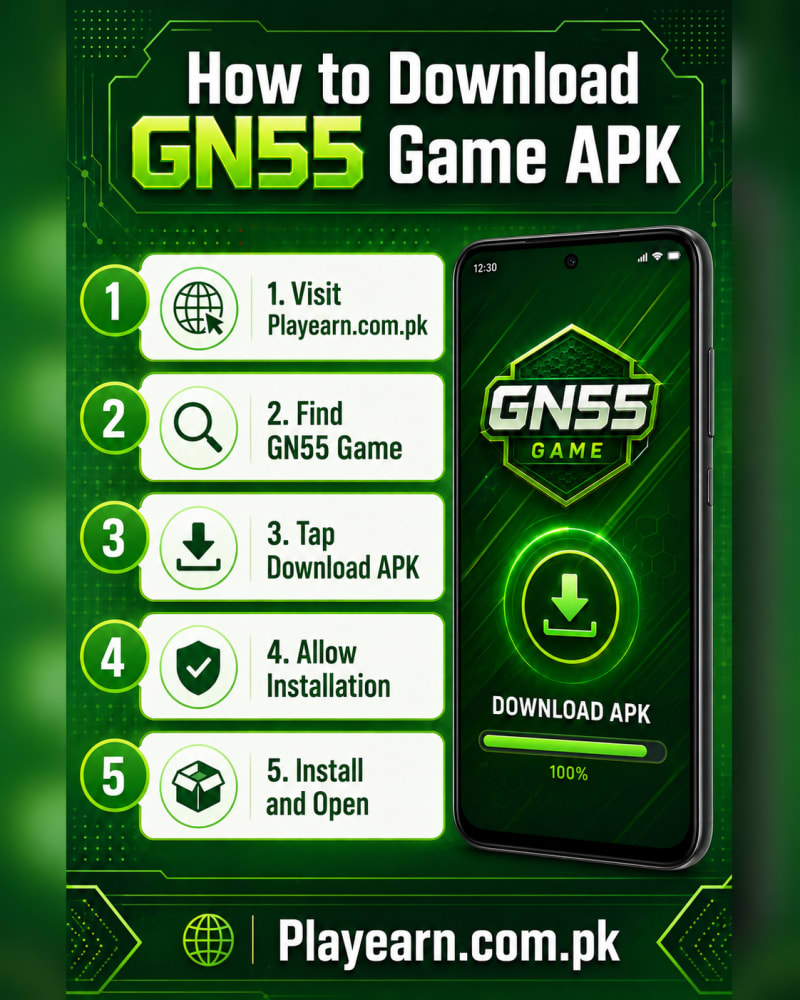
GN55 APK Installation Steps
- Open the selected download page in your Android browser.
- Tap the genuine GN55 APK button once.
- Wait for the file to download completely.
- Open Files or File Manager.
- Navigate to the Downloads folder.
- Select the newly downloaded APK.
- Allow installation from that specific source if Android requests permission.
- Read the permissions shown on the installation screen.
- Tap Install and wait for Android to finish.
- Open the application only after a successful installation message appears.
Once installation is complete, return to your security settings and remove the browser’s permission to install unknown apps. This reduces the chance of accidentally installing another file later. First-time users should also follow our safe Android APK installation guide for additional instructions about inspecting files, checking permissions, enabling installation access, and restoring Android security settings.
Safety Tip: Grant installation access only to the browser or file manager you’re using. Don’t disable Android security across the entire device.
How to Update GN55 Without Losing Account Access
Updating should preserve account information when the new APK uses the same package name and signing certificate. Problems can occur if a different developer signature or modified package is used.
Before updating:
- Save your registered phone number.
- Confirm that you remember the password.
- Record the existing version.
- Keep screenshots of the account balance and transaction history.
- Compare the new APK’s package name with the installed version.
- Avoid deleting the existing app unless an update genuinely fails.
If Android refuses to install the update over the current version, don’t uninstall immediately. First check for a signature conflict, incorrect package or incompatible release.
GN55 Registration and Login
Account creation may require a mobile number, password, OTP and optional invitation code. Use a number you control because it may be needed for login recovery and payment verification.
Registration Checklist
- Open the installed GN55 application.
- Select the registration option.
- Enter an active Pakistani mobile number.
- Create a strong, unique password.
- Check whether the invitation-code field is optional.
- Request the verification code.
- Enter the OTP privately.
- Review the information before creating the account.
An invitation code may be difficult to change after registration. Don’t enter a random code simply because a website labels it as compulsory.
Login Tips
Use the same phone number and password entered during signup. If the account doesn’t open, check for an accidental space, incorrect country format or typing mistake.
Avoid sending your credentials to someone claiming to provide support. A legitimate support process shouldn’t require your full password or OTP.
Account Tip: Store the registered phone number and account ID somewhere private. This information can be useful if the app is reinstalled or the phone is replaced.
Deposits, Withdrawals and Bonuses
Payment methods and account details can change without notice. Confirm every field inside the active GN55 payment screen before transferring money.
Before Making a Deposit
Confirm that you’re logged into the correct account.
Check the minimum deposit displayed in the app.
Read the current bonus conditions.
Verify the recipient name and account number.
Check for processing fees.
Save the transaction ID.
Take a screenshot of the successful transfer.
Keep household and emergency funds separate.
Never transfer money through an unverified social-media agent. If the payment screen and agent instructions show different account details, stop and contact the app operator through a published support channel.
Typical Withdrawal Process
A withdrawal request may involve the following steps:
- Open the account wallet.
- Select the withdrawal option.
- Choose an available payment method.
- Enter the amount.
- Add or confirm the receiving account details.
- Complete any identity or OTP verification.
- Review the information carefully.
- Submit one request and save its reference number.
Payment Warning: Processing times shown inside an app are estimates, not guarantees. Account checks, payment-network delays and incorrect details can increase the waiting time. Readers experiencing a delayed request can review our mobile-game withdrawal pipeline guide to understand verification, request processing, payment-provider delays, bonus checks, and transaction records.
Payment Warning: Processing times shown inside an app are estimates, not guarantees. Account checks, payment-network delays and incorrect details can increase the waiting time.
Understanding GN55 Bonus Conditions
A bonus balance may not be immediately withdrawable. Before accepting or using an offer, check:
| Bonus condition | Why it matters |
|---|---|
| Minimum deposit | Shows how much personal money is required |
| Activity requirement | Explains what must be completed first |
| Eligible games | Some bonuses work only in selected areas |
| Maximum reward | Limits the amount that can be credited |
| Withdrawal condition | May restrict cash-out until requirements are met |
| Expiry date | Unused rewards may disappear |
| Referral requirement | Invited users may need to complete extra steps |
| Account verification | KYC may be required before withdrawal |
If the terms aren’t visible, ask the operator for clarification before depositing. Don’t assume that “bonus credited” means “cash available for withdrawal.”
GN55 APK vs a Typical Store-Listed App
| Area | GN55 APK | Typical store-listed app |
|---|---|---|
| Installation | Downloaded and installed manually | Installed through the app store |
| Version verification | Requires direct file checking | Usually managed through the listing |
| Updates | May require another APK download | Often delivered automatically |
| Permissions | Reviewed during manual setup | Also displayed on the store page |
| Publisher information | May be difficult to verify | Developer profile is normally visible |
| Ratings | Can vary between download websites | Usually collected within the store |
| Security review | User must perform extra checks | Subject to store review, though not risk-free |
| Payment details | Confirm inside the application | Often covered by store and developer policies |
A store listing doesn’t guarantee perfect safety. The difference is that an externally distributed APK places more verification responsibility on the user.
GN55 Game Pros and Cons
| Pros | Cons |
|---|---|
| Several activities may be available under one account | Real-money activities can lead to financial loss |
| APK may run on a range of Android phones | No confirmed iPhone version |
| Pakistan-focused payment options may appear | Published app details conflict across websites |
| Registration appears relatively simple | Manual APK installation requires extra checks |
| Rewards and referrals may be available | Bonus conditions can restrict withdrawals |
| Transaction tools may be included | Developer and publisher information needs clearer verification |
| Lightweight versions may suit basic phones | Unverified files may create privacy or security risks |
Is GN55 Game Safe?
No reviewer can honestly call an APK completely safe based on its interface, download count or a single malware scan. File checks can reduce risk, but they can’t guarantee how future releases will handle personal information, account balances or payments. Readers assessing conflicting claims, developer transparency, payment promises, and download-page ratings can also read our gaming app legit-or-scam review guide for additional warning signs to investigate.
Review the package name, signing certificate and permissions before installation. Be cautious if a gaming app requests access to contacts, call logs, messages or unrestricted storage without explaining why.
GN55 Safety Checklist
The download domain matches the intended website.
The package name is consistent.
The APK signature matches the previous release.
A dated malware scan has been completed.
Permissions match the app’s functions.
The privacy policy identifies the data being collected.
Support details are visible and working.
Payment recipients are confirmed inside the account.
No agent has requested a password or OTP.
A clean scan is helpful evidence, not a lifetime guarantee. Scan each new APK separately because updates can contain different code and permissions.
Is GN55 Game Legal in Pakistan?
Legal claims need more care than most APK websites give them. Pakistan Code lists gambling-related laws, including the Public Gambling Act and the Prevention of Gambling Act. How those laws apply to a particular online platform should be assessed by a qualified Pakistani legal professional.
Pakistan also doesn’t appear in the current Google Play list of regions where approved real-money gambling apps may be distributed. For that reason, a Google Play-style image on a third-party download page shouldn’t be treated as proof of store availability, licensing or legal approval.
Legal Note: This article provides general information, not legal advice. Users should check current local requirements before participating in any real-money activity.
Common GN55 Problems and Troubleshooting
| Problem | Likely cause | What to try |
|---|---|---|
| APK won’t download | Broken link, browser restriction or low storage | Reload the page, check storage and use a current browser |
| “App not installed” | Incompatible Android version or signature conflict | Verify compatibility and check for an existing modified copy |
| Downloaded file won’t open | Incomplete or corrupted download | Delete the file and download it again from the verified page |
| OTP doesn’t arrive | Incorrect number, weak signal or server delay | Check the number, wait briefly and request one new code |
| Login details are rejected | Wrong password, account format or app outage | Re-enter the details and use account recovery |
| App closes after opening | Low memory, damaged data or compatibility issue | Restart the phone, clear cache or reinstall a verified APK |
| Deposit isn’t showing | Wrong recipient or delayed payment confirmation | Keep the receipt and contact operator support |
| Withdrawal remains pending | Account review, incorrect details or processing delay | Check the request status and avoid duplicate submissions |
| Bonus code doesn’t work | Expired, used or account-restricted code | Recheck the promotion terms |
| Balance looks incorrect | Delayed update or transaction-record error | Refresh once, review history and save screenshots |
Fixing “App Not Installed”
Try these steps in order:
- Confirm that the file finished downloading.
- Check available storage.
- Compare the Android version with the APK requirement.
- Look for an older or modified GN55 installation.
- Verify that the update uses the same package and signature.
- Restart the phone.
- Download a fresh copy from the intended source.
Don’t install several “fixed” versions from random websites. Multiple altered APKs can create a much larger security problem.
Fixing Login and OTP Problems
Start by checking the registered phone number and password. If an OTP doesn’t arrive, wait briefly before requesting another code; repeated requests can sometimes trigger a temporary delay.
Use the official recovery option when available. Never pay someone to restore an account, and don’t share the OTP with a person claiming to speed up verification.
Handling a Pending Deposit or Withdrawal
Gather the following information before contacting support:
- GN55 account ID
- Transaction amount
- Date and time
- Payment method
- Transaction reference
- Screenshot of the receipt
- Current status shown in the app
- Receiving wallet or bank details
Send only the information needed to locate the transaction. Passwords, PINs and OTPs should remain private.
Practical GN55 Account-Safety Tips
- Use a password that isn’t shared with another website.
- Keep OTPs private, even during support conversations.
- Save deposit and withdrawal receipts.
- Capture bonus conditions before accepting an offer.
- Log out before giving your phone to another person.
- Don’t chase losses with larger deposits.
- Avoid storing a large balance in the account.
- Check payment details before every transfer.
- Stop if gameplay starts affecting bills or daily responsibilities.
- Report suspicious payment requests through an established support channel.
Responsible-Use Reminder
Set a fixed entertainment budget before opening a paid game. Once that amount is gone, stop. Borrowing money or trying to recover a loss with a larger deposit can quickly turn a small setback into a serious financial problem.
Frequently Asked Questions
What is the latest GN55 Game version?
A single version couldn’t be established because published sources show conflicting details. Check the APK version, package name, file size and signature before installing it.
Is GN55 Game available on Google Play?
A verified Pakistan Google Play listing wasn’t established during the research for this article. Search directly inside Google Play rather than trusting a badge displayed on a download website.
Does GN55 Game work on iPhone?
GN55 is mainly distributed as an Android APK, and APK files can’t be installed directly on an iPhone. A genuine iOS release hasn’t been independently established.
Is an invitation code required for registration?
The registration form may contain an invitation-code field. Check whether it is optional before entering a code because referral details may be difficult to change after account creation.
Which payment methods are available in Pakistan?
JazzCash, Easypaisa and bank-related options are commonly mentioned. Actual availability can vary, so use only the methods and recipient details shown inside your current GN55 account.
Why is my GN55 withdrawal pending?
Possible causes include identity verification, incorrect payment details, payment-network delays or an operator review. Save the request reference and contact the app operator instead of submitting several identical requests.
Why is my bonus code not working?
The code may have expired, already been used or be unavailable for your account. Check its spelling, eligibility rules and expiry date before trying again.
Can I earn guaranteed money through GN55?
No. Game results, bonuses and referral rewards don’t create guaranteed income. Deposited funds may be lost, so GN55 should be treated as entertainment.
Final Verdict
GN55 Game may interest Android users looking for several gaming and reward features under one account. Its Pakistan-focused payment options and straightforward registration process may also make it easier for local users to understand.
The bigger issue isn’t the installation process; it’s the lack of consistent public information. Version numbers, file sizes, compatibility claims, payment limits and developer details vary between pages, so a download button alone isn’t enough evidence.
Check the file before installing it. Read bonus terms before depositing. Save every payment record, keep your OTP private and set a spending limit you won’t exceed.
A useful GN55 review shouldn’t promise easy income or instant withdrawals. It should help readers make a careful decision—and walk away when the details don’t add up. Readers can browse the complete PlayEarn Android game library to compare other lightweight applications, APK requirements, payment features, reward systems, and supporting guides.



Comments
No comments yet — be the first to share your experience.